Make diagrams that move.
Motionix is a free online editor for animated diagrams. Draw boxes and arrows as you would anywhere else, give any line a flow, choose the order things appear, then export a looping GIF or a video that plays exactly as your canvas does.
The editor is free. No card needed.
HowThree steps
How it works
01
Draw it
Start blank, open one of the templates, or describe the diagram to Weave and watch it draw.
02
Make it move
Pick a flow for each connector and decide what appears first, second and last.
03
Export it
A looping GIF for chat and docs, MP4 or WebM for slides and social, PDF or SVG for print.
WhatFeatures
What makes a diagram move here
Twenty flow effects
Dashes, packets, comets, chevrons and more, on any connector, each with its own speed, size, colour and direction.
Steps that build up
Choose the order. The page builds itself in that order on the canvas, in Present mode and in every export.
Exports that match
One renderer draws the canvas and every exported frame, so the GIF is the diagram you saw, not a screen recording of it.
Lines that stay attached
Connectors hold on to their shapes as you move things, with straight, curved, elbow and freely bent routes.
Motion along a path
Send a token or a label along a line to show what travels, and how fast.
Stills that are finished
PDF, SVG and PNG always show the whole diagram, with every step in place.
ExamplesTemplates
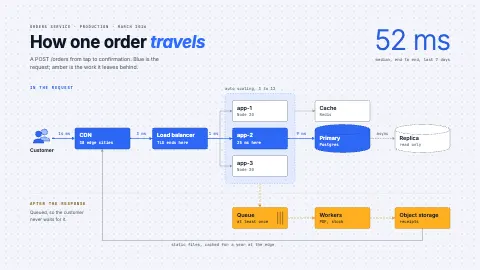
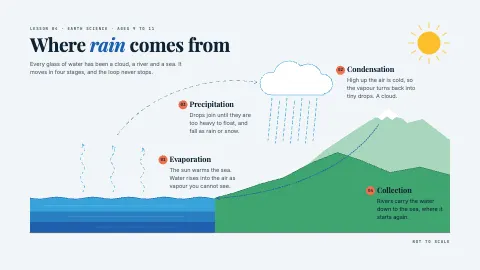
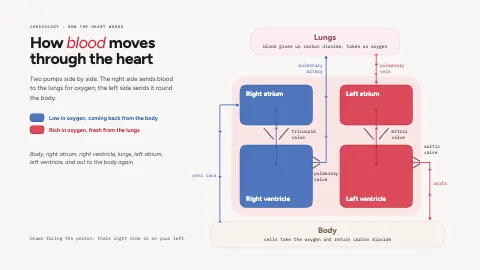
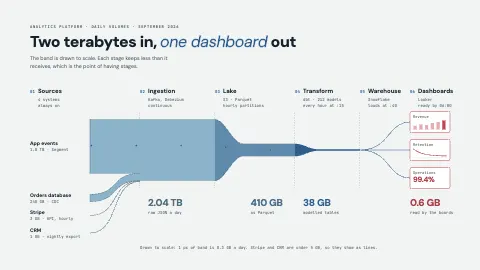
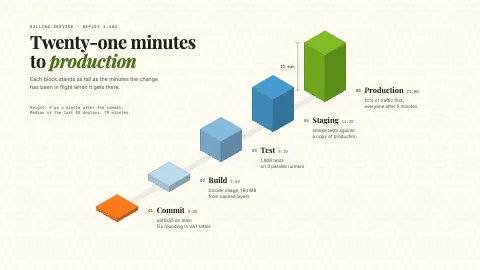
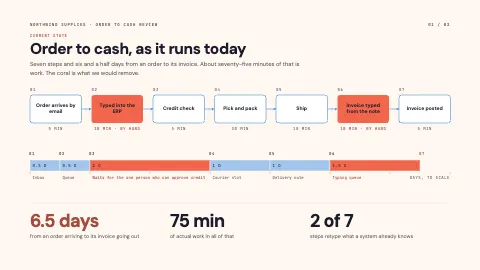
Animated diagrams to start from
Each one is an ordinary page you can change. Open it, then edit, restyle or animate anything on it.
FAQQuestions
Questions, answered.
How do I make an animated diagram?
Draw your shapes and connect them, select a connector and choose a flow effect, then press Sequence under Animate flow so each shape appears as its line arrives, or set your own order under Steps. Press Play to watch it, Present to show it full screen, or Export to save a GIF or video.
Can I export an animated diagram as a GIF?
Yes. Export as GIF, MP4 or WebM, and the file loops exactly as the canvas plays. GIF, MP4 and WebM export come with Pro and Advanced; PNG, JPG, WebP, SVG and PDF are free on every plan.
Is it free?
The editor, every template and still exports are free with no time limit. Pro adds GIF and video export, and Weave, the AI that draws from a description.
Will the GIF look the same as my canvas?
Yes. The canvas, Present mode and every exported frame are drawn by the same renderer from the same document, so nothing shifts, speeds up or drops out on the way out.
Can I animate a diagram I already have?
Drop in an SVG and its parts become shapes you can edit, colour and animate. For the flow effects, redraw the arrows as Motionix connectors so they can carry motion.