Lesson visuals that build one step at a time.
Motionix helps teachers and tutors make lesson slides, science diagrams and revision sheets that reveal one idea after another, so the class follows the order. It is free, there is nothing to install, and every page is ready for the classroom screen or the printer.
The editor is free. No card needed.

HowThree steps
How it works
01
Pick a lesson
Start from a science, maths or language template, or describe the topic to Weave.
02
Set the order
Choose what appears first, so the diagram explains itself in the order you teach it.
03
Teach and print
Present on the classroom screen, print the A4 revision sheet, or share a GIF with the class.
WhatFeatures
Made for the classroom
Diagrams that show the process
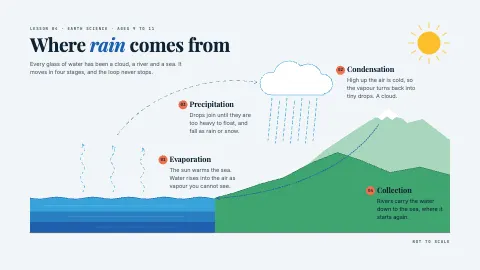
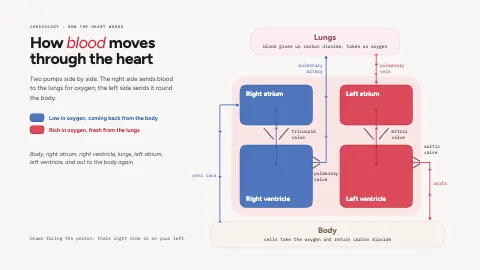
Rain that falls, blood that flows through the heart, a cell dividing: motion that carries the meaning.
Builds in teaching order
Labels and arrows arrive when you would say them, and the page holds once it is complete.
Print-ready sheets
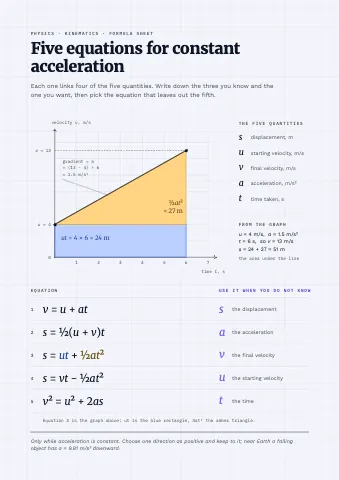
Formula sheets, Cornell notes and timetables at A4, exported to PDF with every step in place.
Proper equations
Subscripts and superscripts set as text, so 6CO₂ and x² read the way they are written.
From a topic
Ask Weave for "the water cycle for ages 9 to 11" and adjust what it draws.
For students too
Revision notes, project charts and presentations, free in any browser.
ExamplesTemplates
Lesson templates
Each one is an ordinary page you can change. Open it, then edit, restyle or animate anything on it.


FAQQuestions
Questions, answered.
Is Motionix free for teachers?
Yes. The editor, every lesson template, Present mode and PDF, PNG and SVG exports are free. GIF and video export and Weave come with Pro and Advanced.
Can I show a diagram one step at a time?
Yes. Set the build order on the page and it plays in that order when the page opens in Present mode, then holds complete while you talk.
Can I print the lessons?
Yes. Make a page at A4 portrait or landscape and export a PDF. Printed pages and PDFs show the finished diagram with every step in place.
Do students need to install anything?
No. Motionix runs in current Chrome, Edge, Safari and Firefox, so it works on school computers and at home.