Timelines drawn to scale.
Motionix is a free online timeline maker for project plans, Gantt charts, product roadmaps, onboarding plans and the order of a day. Place each stage where it falls in time, let the stages appear in order, and export a PDF for the wall or a GIF for the update.
The editor is free. No card needed.
HowThree steps
How it works
01
Set the scale
Days, weeks, months or the hours of one day, along a line or down the page.
02
Place each stage
Bars for work that takes time, dots for milestones, and labels that sit beside them.
03
Share the plan
A PDF or PNG for the wall and the wiki, or a GIF where each stage arrives in turn.
WhatFeatures
Plans people can read at a glance
Gantt charts
One bar per task at its true length, grouped by phase, with dependencies drawn as connectors that stay attached.
Roadmaps that show certainty
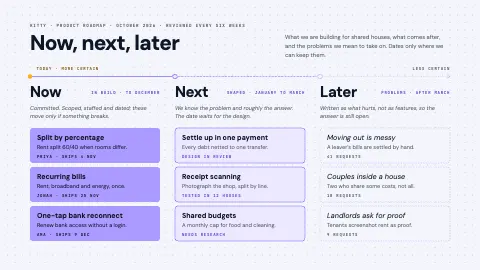
Solid for what is committed, outlined for what is next, dashed for what is only an idea.
Orders of the day
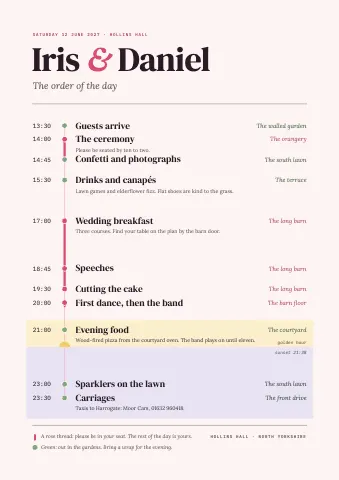
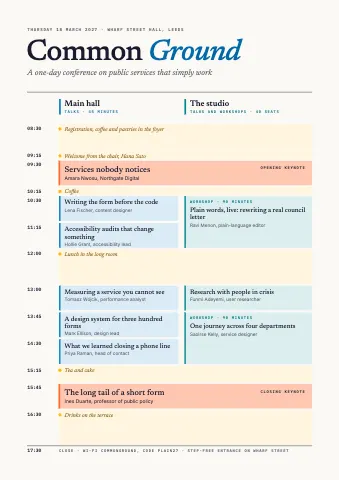
Agendas, wedding timelines and conference programmes set on a real time axis.
Stages that appear in order
Each stage arrives when you reach it in the meeting, in Present mode and in the exported video.
Snap to a grid
Bars and labels line up on the grid, and grid repeat lays out weeks or months in one move.
From a description
Tell Weave the phases and dates and it draws the timeline on your canvas, ready to adjust.
ExamplesTemplates
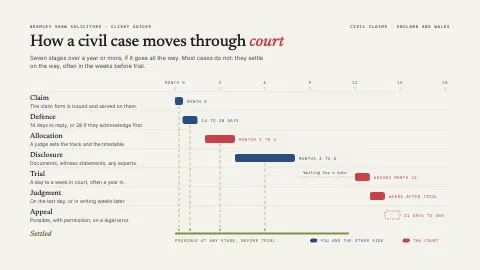
Timeline, roadmap and Gantt templates
Each one is an ordinary page you can change. Open it, then edit, restyle or animate anything on it.
FAQQuestions
Questions, answered.
How do I make a timeline online for free?
Open Motionix, choose a size, draw a line for the time scale, and place a bar or a dot for each stage with its label. Export a PDF, PNG or SVG, all free.
Can I make a Gantt chart?
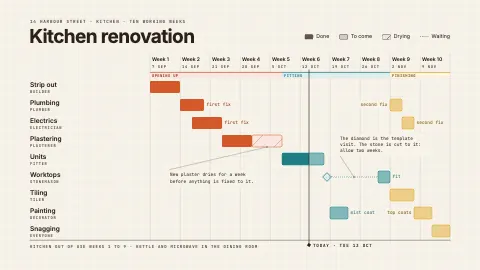
Yes. The kitchen renovation template is a ten-week Gantt chart: one bar per trade, coloured by phase, with a line for today. Change the tasks and the lengths to make it yours.
Can a timeline be animated?
Yes. Set the order and each stage appears in turn when the page plays, in Present mode and in GIF or MP4 exports. GIF and video export come with Pro and Advanced.
Can I print a timeline?
Yes. Make it at A4 landscape, or any size you set, and export a PDF. Printed pages show the whole timeline with every stage in place.