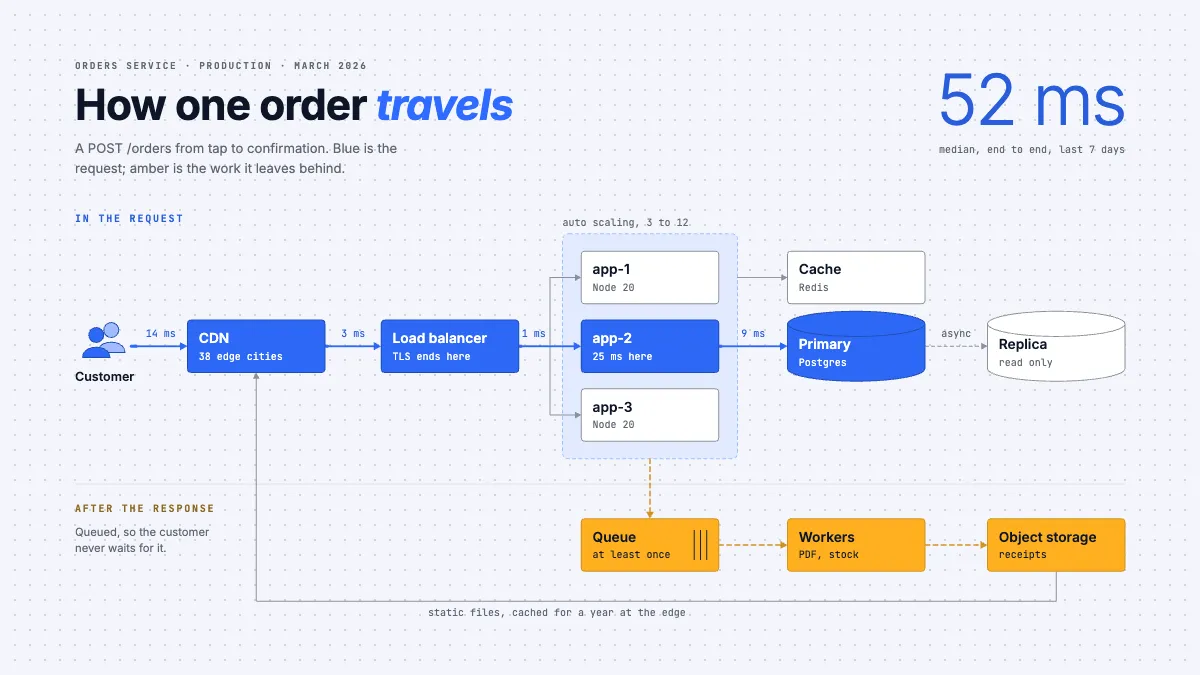
Free templateWeb app architecture diagram
Web app architecture
One request traced through CDN, load balancer, app tier and database, timed segment by segment, with the queued work drawn beneath it.
Free. It opens in the Motionix editor as your own copy.
Download the pictureWebP, 1200 × 675, free to use. To change the words or colours, open it in the editor.
- Size
- 1920 × 1080 px
- Pages
- 1
- Motion
- Yes, plays live and in GIF or video
- Category
- Technical
What it shows
- A timed request path
- Packets moving on the live path
- Sync and async split by a rule
Good for
How to use it
- Open the template. It becomes a project in your account.
- Change the words, colours and pictures. Every part is an ordinary shape, line or text box.
- Press Play to watch it build, then present it or export it.
What is a web app architecture diagram?
A web app architecture diagram shows the parts of a web application and how a request moves between them: the user's device, a CDN, a load balancer, the application servers, caches, databases and any background queues. Good ones separate the synchronous path, the work a user waits for, from asynchronous work done after the response. Engineers use them to explain a system, plan changes and find bottlenecks.
When it helps
- Onboarding a new engineer who needs to know which service handles what before their first on-call shift.
- A design review for a new feature, checking which components it touches.
- Explaining slow responses by tracing the time spent in each hop of a request.
- Documenting a system for a security review or a conversation about infrastructure costs.
Tips
- Use colour for meaning only: one colour for the request path, one for async work, grey for everything else. A different colour per box tells readers nothing.
- Label every database as primary or read-only replica. Confusing the two is a classic cause of stale reads and failed writes.
- Date the diagram and name the environment. Production, staging and a laptop rarely match, and an undated architecture drawing is usually describing last year.
How to draw a web app architecture diagram
Pick one request to follow
Choose a real, important action, such as placing an order, and draw the components it passes through from left to right. One traced path is clearer than every possible connection at once.
Draw each tier as a box
Show the CDN, load balancer, application servers and data stores, each named with what it is and one useful fact, such as where TLS ends or which database engine runs there.
Group replicated servers
Draw identical app servers inside one dashed zone labelled with its scaling range, such as 3 to 12 instances, instead of a row of unrelated boxes.
Time the path
Label each hop with its typical latency and check the hops add up to the end-to-end figure. Timings turn the drawing into a tool for finding slowness.
Separate what the user waits for
Put queues, workers and storage for background jobs below a dividing line. Nobody waits on that work, so it should look different from the request path.
Add the secondary flows
Show replication, cache reads and static file pulls in a lighter line, so they are visible without competing with the main path for attention.
FAQQuestions
Common questions.
What are the main components of a web application architecture?
Typically a client, such as a browser or mobile app; a CDN for static files; a load balancer; one or more application servers; a cache; a primary database, often with read replicas; and a queue with workers for background jobs. Larger systems split the application into several services.
What is the difference between synchronous and asynchronous processing?
Synchronous work happens inside the request, so the user waits until it finishes. Asynchronous work goes on a queue and is done afterwards by a worker, such as generating a PDF receipt or sending an email. Moving slow work off the request path keeps responses fast.
What does a load balancer do?
It receives incoming traffic and spreads it across several application servers, so no single server is overloaded and one can fail without taking the site down. Load balancers often terminate TLS, run health checks and route requests by path or host name.
More technical templates
Architecture, networks, circuits, plans and data.