Thumbnails made for the feed.
Motionix is a free online YouTube thumbnail maker. Start at 1280 by 720, set three to five words large enough to read at the size of a stamp, add your photo or a drawn idea, and export a PNG or JPG for YouTube Studio.
The editor is free. No card needed.
HowThree steps
How it works
01
Pick the size
YouTube thumbnail, YouTube Short cover or YouTube channel banner, from the size menu, so nothing is cropped on upload.
02
Set one idea
A face or an object, a hard contrast, and a few words. Start from a cover template or a blank page.
03
Export it
A PNG or JPG for YouTube Studio, or a GIF or MP4 of the same design for a trailer or a post.
WhatFeatures
Built for the size it is seen at
Every YouTube size
Thumbnails at 1280 by 720, Shorts covers at 1080 by 1920 and channel banners at 2560 by 1440, each a preset.
Words that read small
Outline and shadow on any text, your own uploaded fonts, and type set big enough for a phone.
Your photos
Paste, drop, upload or import a picture from a link, then crop it into a shape or put a shadow behind it.
Icons and drawn ideas
A built-in icon library and shapes you can combine, for a globe, a chart or an arrow that tells the story.
A cover that moves
The same design exports as a GIF or MP4 for a channel trailer, a community post or a social clip.
Drafted from the title
Describe the video to Weave and it drafts a cover on your canvas that you edit like anything else.
ExamplesTemplates
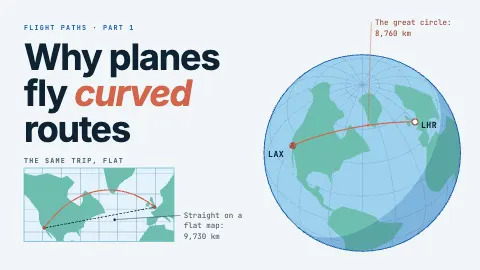
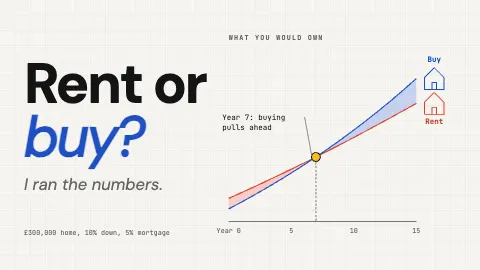
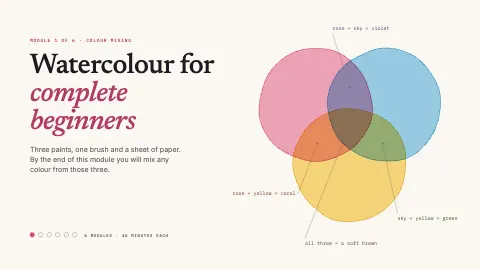
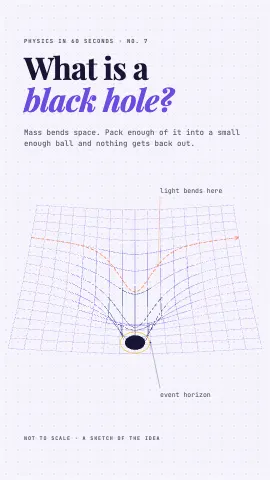
Thumbnail, Shorts and banner templates
Each one is an ordinary page you can change. Open it, then edit, restyle or animate anything on it.
FAQQuestions
Questions, answered.
What size is a YouTube thumbnail?
A YouTube thumbnail is 1280 by 720 pixels, a 16:9 shape, with a minimum width of 640 pixels, uploaded as a JPG, PNG or GIF. The YouTube thumbnail size in Motionix is set to 1280 by 720.
Is the thumbnail maker free?
Yes. Making thumbnails, every cover template, and PNG and JPG export are free. GIF and video export, and Weave, come with Pro and Advanced.
What size is a YouTube channel banner?
Upload 2560 by 1440 pixels and keep the words and logo inside the centre 1546 by 423, the strip every device shows. The channel banner size in Motionix uses those numbers.
Can I make a Shorts cover too?
Yes. The YouTube Short cover size is 1080 by 1920. Keep the main words away from the bottom and the right edge, where the player places the title and the buttons.
Can I put my own photo on a thumbnail?
Yes. Paste or drop a photo onto the canvas, upload it, or import it from a link. It stays part of the project, so the thumbnail opens the same next time.