GuideAbout 15 minutes
How to make a diagram that builds step by step
The short answer
Open the page's Steps chapter in Motionix, press Add step for each stage, and put objects into steps from their Motion chapter. The page then builds in that order on the canvas, in Present mode and in every GIF or video, and stills show it finished.
What you need
- A Motionix account (free)
- Pro or Advanced only for GIF and video export
Step 1Add the steps
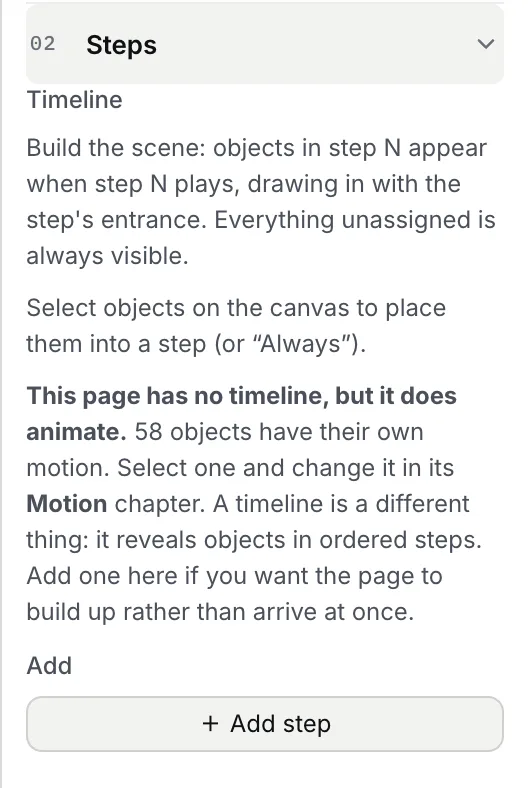
Click an empty part of the canvas and open Steps in the inspector. Press Add step for each stage of the explanation. Each step has a length and an entrance, such as a fade.
Step 2Put each part in its step
Select the objects for a stage, then choose their step under Step in their Motion chapter. Anything left in Always is on screen from the start, such as the title.
Step 3Or let the arrows decide
For a flowchart or a process, Animate flow and Sequence the diagram build the order from the connectors instead: each shape appears when its line arrives.
Step 4Present or export it
Press play under the canvas to watch it. In Present, each page plays its build when it opens and then holds, finished, while you talk. Export a GIF or video to share it; PDF and PNG show the page complete.

Tips
- Teach in the order you would speak: the label arrives with the part it names.
- Keep stages short; a step of about a second reads as deliberate without making people wait.
- Moving lines and emphasis keep running after the build, so a finished page still shows what flows.
Checked against Motionix on 2026-10-21.