Free templateFinance YouTube thumbnail
Rent or buy? thumbnail
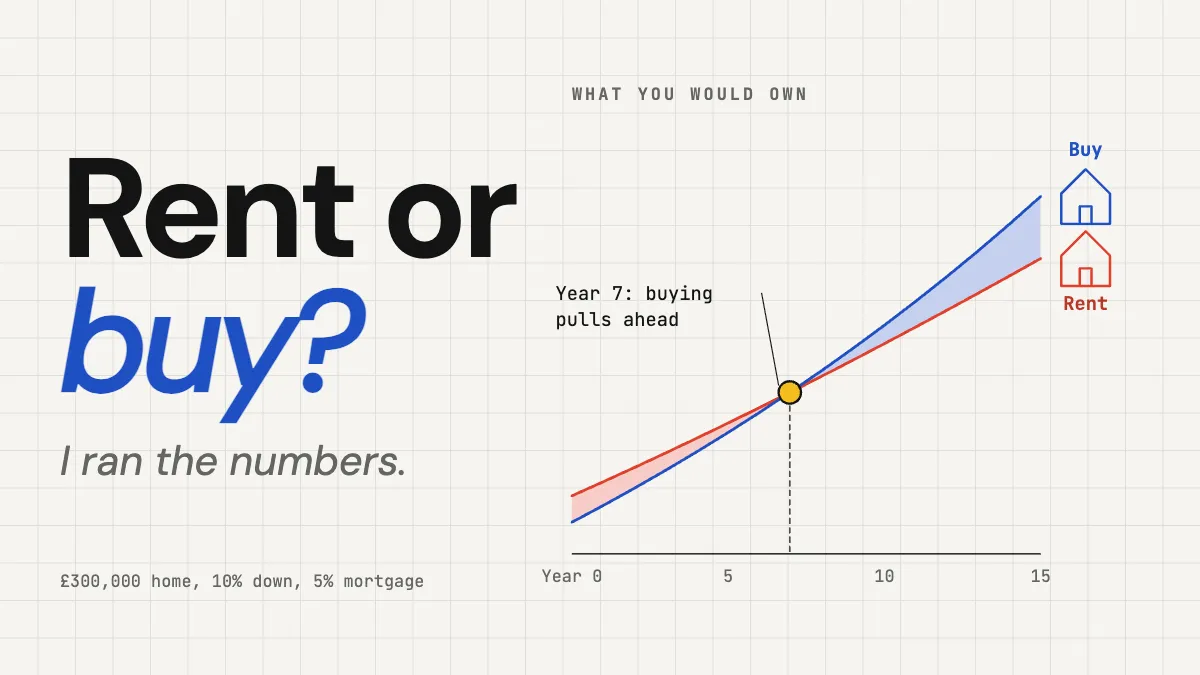
A YouTube thumbnail for a money video: two lines of wealth computed from real assumptions, crossing in year 7.
Free. It opens in the Motionix editor as your own copy.
Download the pictureWebP, 1200 × 675, free to use. To change the words or colours, open it in the editor.
- Size
- 1280 × 720 px
- Pages
- 1
- Motion
- Yes, plays live and in GIF or video
- Category
- Covers
What it shows
- Chart computed from a model
- Crossing found from the numbers
- Lines that draw themselves
Good for
How to use it
- Open the template. It becomes a project in your account.
- Change the words, colours and pictures. Every part is an ordinary shape, line or text box.
- Press Play to watch it build, then present it or export it.
What makes a good finance YouTube thumbnail?
A good finance YouTube thumbnail turns a money question into something the viewer can see, usually a number, a chart or a comparison, on the standard 1280 x 720 canvas. Finance audiences are wary of hype, so the strongest designs promise a clear answer instead of a shock: a short question such as rent or buy, a chart where two lines cross, and a quiet note of the assumptions behind it.
When it helps
- Personal finance creators comparing two choices, like renting against buying or overpaying a mortgage against investing.
- Videos built on a spreadsheet model, where the chart itself is the answer.
- Channels that want a trustworthy look rather than the shocked-face style.
- Refreshing an evergreen money video when interest rates or prices change.
Tips
- Money viewers are sceptical. A thumbnail promising guaranteed returns or secret tricks invites distrust in the comments, while a plotted answer invites a click.
- Use one chart, never two. Thumbnail charts are read in a fraction of a second, so the shape of the lines must tell the story without axis values.
- Keep currency and assumptions local to your audience; a UK house price and mortgage rate tell British viewers the video is for them.
How to make a finance YouTube thumbnail
Frame the decision as a question
Two or three words, such as rent or buy, set up a choice the viewer is already weighing. Highlight the option the video ends up favouring.
Plot the real model
Build the comparison in a spreadsheet first, then draw the chart from those numbers. A crossing point found from the data, like year 7, is worth more than a guessed curve.
Simplify the chart hard
Remove gridlines, legends and most labels. Keep two lines, one axis with a few years marked, and a dot at the moment that matters.
State the assumptions small
One line at the bottom, for example a £300,000 home with 10% down and a 5% mortgage, shows the result comes from a model and heads off the obvious comments.
Colour-code each option
Give each choice one colour and use it everywhere: its line, its label and any icon, such as a house. Viewers decode the key once and read the rest instantly.
FAQQuestions
Common questions.
Should finance YouTube thumbnails show money?
Not necessarily. Piles of cash and currency signs are so common that they are easy to ignore. A specific number, a chart or the thing in question, such as a house, often explains the video better and looks more trustworthy than generic money imagery.
Do charts work in YouTube thumbnails?
Yes, if they are simple. One or two thick lines with a clear shape, like a crossing or a sharp rise, read at small sizes. Detailed charts with axes, labels and many series turn to noise and belong in the video itself.
Is it better to rent or buy a home?
It depends on how long you stay, prices relative to rents, interest rates, upkeep and what a renter does with the money not spent on a deposit. Buying usually needs several years to recover the costs of buying and selling, which is why comparisons show a crossing point rather than one answer.
More covers templates
Thumbnails, episode covers, banners and headers.