Free templateReels cover
Why is the sky blue?
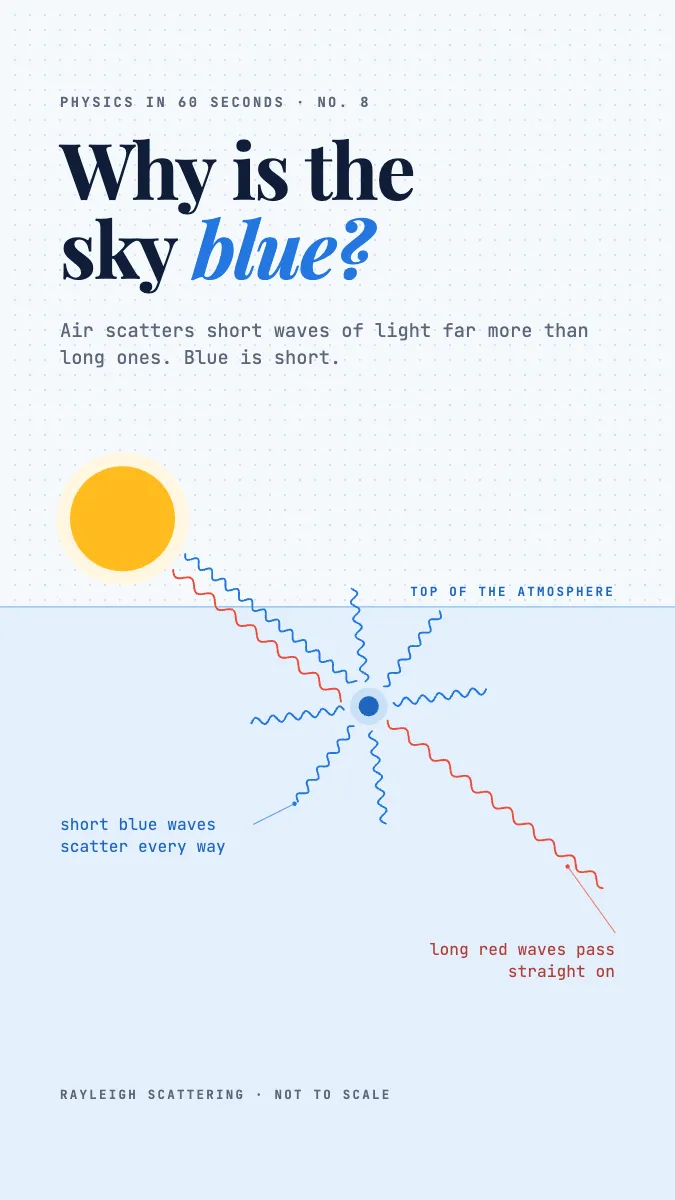
A Short cover where sunlight meets one air molecule: short blue waves scatter every way, long red waves carry on.
Free. It opens in the Motionix editor as your own copy.
Download the pictureWebP, 675 × 1200, free to use. To change the words or colours, open it in the editor.
- Size
- 1080 × 1920 px
- Pages
- 1
- Motion
- Yes, plays live and in GIF or video
- Category
- Covers
What it shows
- Waves drawn at their real ratio
- Dot grid ground
- Builds in reading order
Good for
How to use it
- Open the template. It becomes a project in your account.
- Change the words, colours and pictures. Every part is an ordinary shape, line or text box.
- Press Play to watch it build, then present it or export it.
What is a Reels cover?
A Reels cover is the image Instagram shows for a Reel on your profile grid and anywhere the video is not playing. Reels are 1080 x 1920 pixels at 9:16, and you can pick a frame from the video or upload a separate image as the cover. Because the profile grid shows a shorter portrait crop of it, the title and the main picture belong in the middle of the frame.
When it helps
- Physics teachers answering one classic question per Reel, such as why the sky is blue.
- Science communicators keeping a profile grid tidy with covers that share one layout.
- Cross-posting one vertical cover to Reels, Shorts and TikTok without redesigning it for each.
- A pinned Reel at the top of a profile that has to explain what the whole account is about.
Tips
- Make the cover work with no sound and no captions. People browse a profile grid silently, so the title must ask the full question by itself.
- Use a light, even ground such as a faint dot grid. Photographic backgrounds fight with small diagrams and labels on a phone screen.
- Name the effect in small print, here Rayleigh scattering. Curious viewers search the term later, and it signals the explanation rests on real physics.
How to make a Reels cover
Plan for the grid crop
Set up a 1080 x 1920 canvas, then mark a centred 1080 x 1440 area. Keep every word and the main drawing inside it so the profile grid never cuts them off.
Pick one physical moment
Choose the instant that explains the answer. For a blue sky, that is sunlight meeting a single air molecule, with blue light scattering outwards and red light carrying straight on.
Keep real proportions where they matter
If the explanation depends on a ratio, show it. Blue light's wavelength is roughly two thirds of red's, so its waves should look visibly tighter, not merely a different colour.
Order the reading path
Place the title first, the diagram second and a one-line answer last. If the cover animates, build it in that same order so the eye never has to jump back.
Set it as the cover
When posting, open the cover option and either choose this frame from the video or add the image from your camera roll. Check the grid preview before sharing.
FAQQuestions
Common questions.
What size is an Instagram Reels cover?
Make it 1080 by 1920 pixels, the same 9:16 shape as the Reel. Instagram shows a shorter portrait crop on the profile grid, so keep the title and main picture in the central area rather than close to the top or bottom edge.
Can you change a Reel's cover after posting?
On most accounts, yes: open the Reel, choose edit, and look for the option to change the cover, where you can pick another frame or upload an image. Where it is missing, updating the app usually brings it back, since the feature has rolled out unevenly.
Why is the sky blue?
Sunlight contains every colour, and the molecules in air scatter short wavelengths far more strongly than long ones, an effect called Rayleigh scattering. Blue light is scattered all over the sky and reaches your eyes from every direction, while red and orange light mostly passes straight through.
More covers templates
Thumbnails, episode covers, banners and headers.