Free templateConference agenda
Conference programme
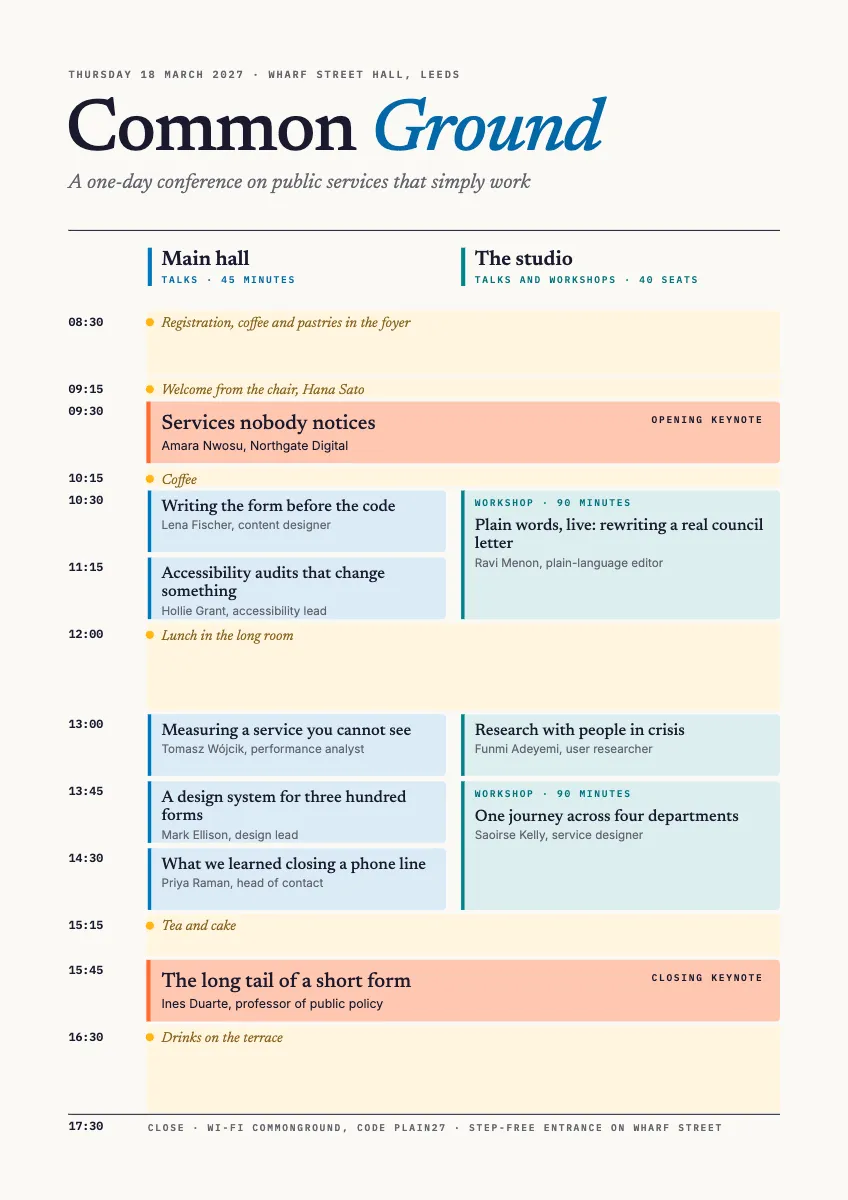
A one-day, two-track conference programme set on a true time axis, keynotes and breaks running across both rooms.
Free. It opens in the Motionix editor as your own copy.
Download the pictureWebP, 848 × 1200, free to use. To change the words or colours, open it in the editor.
- Size
- 1240 × 1754 px
- Pages
- 1
- Motion
- Yes, plays live and in GIF or video
- Category
- Plans
What it shows
- Sessions as long as they last
- Two tracks side by side
- Builds through the day
Good for
How to use it
- Open the template. It becomes a project in your account.
- Change the words, colours and pictures. Every part is an ordinary shape, line or text box.
- Press Play to watch it build, then present it or export it.
What is a conference agenda?
A conference agenda, or programme, sets out every session of the event in time order: when it starts and ends, where it takes place, its title and who is speaking. Multi-track conferences show parallel rooms side by side, with keynotes and breaks running across all of them, so attendees can plan which sessions to join and where to be.
When it helps
- An event organiser printing the day's programme for delegates to carry between rooms.
- Helping attendees choose between two parallel sessions at the same time.
- Briefing speakers and room hosts on exact start times, rooms and lengths.
- Publishing the programme in advance to help people decide whether to buy a ticket.
Tips
- Leave time between sessions in different rooms. People need a few minutes to move, refill coffee and talk to the speaker they have just heard.
- Put a strong speaker straight after lunch, not only at the start. The early afternoon slot is the hardest to fill and benefits most from a big draw.
- Write session titles that say what attendees will learn. A clever title on a printed programme gets skipped when people are choosing in a hurry.
How to make a conference agenda
Set the frame of the day
Fix the start, the finish, lunch and the breaks first. Everything else fits between them, and breaks matter as much to attendees as any talk.
Place the plenaries
Put the opening and closing keynotes in the largest room, when everyone is present. They anchor the day and mark its beginning and end.
Decide the tracks
If sessions run in parallel, give each room a column and a theme. Avoid putting two sessions most people want to see against each other.
Fill the slots
Add each session with its time, room, title and speaker. Keep session lengths consistent within a room so the rooms change over together.
Draw time to scale
Make each session's space match its length, so a ninety minute workshop looks twice as long as a talk and nobody misreads when it ends.
Add the practical details
Include the Wi-Fi details, the venue address, step-free access, where lunch is served and who to ask for help on the day.
FAQQuestions
Common questions.
What is the difference between a conference agenda and a programme?
Many organisers treat the two words as one. An agenda usually means the schedule of sessions and times, while a programme can also include speaker biographies, venue maps, sponsor information and other details. In British English, programme is the more common word for a printed event schedule.
What is a track at a conference?
A track is a series of sessions on one theme or in one room that runs alongside others. A two-track conference has two sessions at once for most of the day, letting attendees choose, while keynotes and breaks are usually shared by everyone.
How long should conference sessions be?
Talks commonly run from twenty to forty-five minutes, workshops from sixty to ninety minutes, and keynotes from thirty minutes to an hour. Shorter talks tend to hold attention better. Whatever the lengths, keep them consistent within a track so rooms change over at the same time.
More plans templates
Timelines, schedules, itineraries and trackers.