Free templateER diagram
Library ER diagram
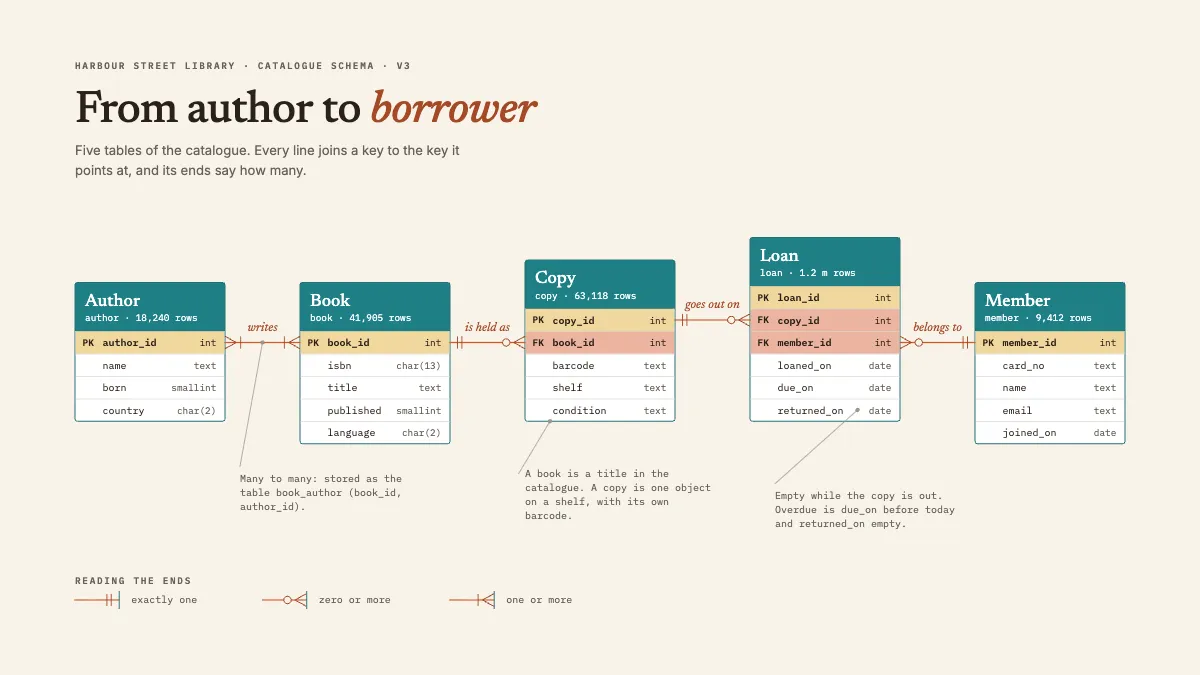
Member, Book, Copy, Loan and Author with key fields and crow’s-foot ends, staggered so every relationship is one straight line between keys.
Free. It opens in the Motionix editor as your own copy.
Download the pictureWebP, 1200 × 675, free to use. To change the words or colours, open it in the editor.
- Size
- 1920 × 1080 px
- Pages
- 1
- Motion
- Yes, plays live and in GIF or video
- Category
- Technical
What it shows
- Crow’s-foot notation drawn
- Keys aligned to keys
- Relationships read as sentences
Good for
How to use it
- Open the template. It becomes a project in your account.
- Change the words, colours and pictures. Every part is an ordinary shape, line or text box.
- Press Play to watch it build, then present it or export it.
What is an ER diagram?
An ER diagram, or entity relationship diagram, shows the things a database stores and how they relate. Each entity, such as a book or a member, becomes a table listing its attributes, with a primary key that identifies each row and foreign keys that point to rows in other tables. Lines between tables carry cardinality, often in crow's foot notation, saying whether a row links to one, none or many rows elsewhere.
When it helps
- Designing the database for a new application before writing any SQL.
- A student modelling a library, shop or school system for a databases assignment.
- Explaining an existing schema to a developer about to write reports against it.
- Reviewing a data model for duplicated data or relationships it cannot store.
Tips
- Separate the idea from the object. A book is a title in the catalogue; a copy is a physical item with a barcode. One table for both breaks when the library buys a second copy.
- Read every relationship aloud both ways: "a member has zero or more loans; a loan belongs to exactly one member". If either sentence sounds wrong, so are the ends.
- Name keys consistently, such as table_id everywhere. When a foreign key shares its target's name, joins are easy to write and mistakes stand out.
How to draw an ER diagram
Find the entities
List the nouns the system must remember, such as author, book, copy, loan and member. Each becomes a table; two nouns that always carry the same data may be one entity.
Add attributes and keys
For each table, list its fields with their types and mark the primary key. Then add foreign keys wherever one table refers to another, like copy_id on a loan.
Draw the relationships
Join each foreign key to the primary key it references. Name the line with a verb so it reads as a sentence: a book is held as copies.
Mark the cardinality
At each end, show how many rows can be linked. Two bars mean exactly one, a ring with a crow's foot zero or more, and a bar with a crow's foot one or more.
Resolve many-to-many links
Where an author writes many books and a book can have many authors, add a junction table, such as book_author, holding both foreign keys.
Lay it out to read
Place tables so lines are short and straight, ideally with each key level with the key it references. Crossing lines make cardinality hard to read.
FAQQuestions
Common questions.
What is crow's foot notation?
It is a way of drawing cardinality on the ends of relationship lines. A three-pronged crow's foot means many, a bar means one and a circle means zero. Combined, they give a minimum and a maximum: a ring with a crow's foot is zero or more, two bars is exactly one.
What is the difference between a primary key and a foreign key?
A primary key uniquely identifies each row in its own table, such as member_id in the member table. A foreign key is a column in another table that stores that value to link back to it, such as member_id in the loan table, recording who borrowed.
What are the three types of relationships in an ER diagram?
One-to-one, where each row links to at most one row in the other table; one-to-many, the most common, such as one member with many loans; and many-to-many, such as authors and books, which a relational database stores through a junction table.
More technical templates
Architecture, networks, circuits, plans and data.