Free templateMobile app wireframe
Recipe app wireframes
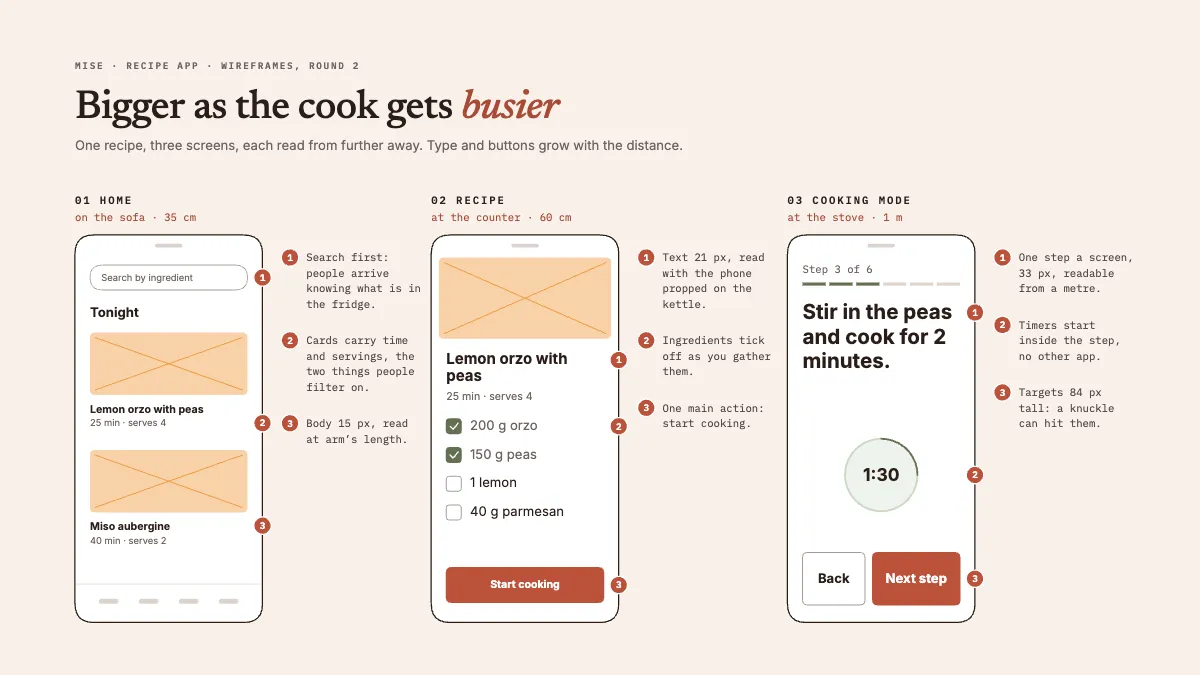
Three phone wireframes for one recipe, home, recipe and cooking mode, with numbered notes on why type grows at the stove.
Free. It opens in the Motionix editor as your own copy.
Download the pictureWebP, 1200 × 675, free to use. To change the words or colours, open it in the editor.
- Size
- 1920 × 1080 px
- Pages
- 1
- Motion
- Yes, plays live and in GIF or video
- Category
- Technical
What it shows
- Low-fidelity wireframes
- Numbered annotations
- One idea across three screens
Good for
How to use it
- Open the template. It becomes a project in your account.
- Change the words, colours and pictures. Every part is an ordinary shape, line or text box.
- Press Play to watch it build, then present it or export it.
What is a mobile app wireframe?
A mobile app wireframe is a simple, low-fidelity drawing of an app screen that shows its layout, content and controls without final colours, images or styling. Grey bars stand in for text and crossed boxes for photographs. Wireframes let a team agree what goes on each screen, and in what order, before anyone spends time on visual design or code, and they cost almost nothing to change.
When it helps
- A UX designer sketching the key screens of an idea to test with five users.
- A design review in which numbered notes explain why each screen is laid out as it is.
- Briefing a developer on content and interactions before the visual design is ready.
- A founder showing an app idea to early customers without building anything.
Tips
- Use real text where it matters. "Stir in the peas and cook for 2 minutes" tests a layout far better than placeholder Latin, especially for line length and type size.
- Size tap targets for the worst moment, not the average one. Platform guidelines suggest at least 44 to 48 points, and wet or floury hands need more.
- Keep wireframes plain and grey. Colour too early invites comments on taste, and the review drifts away from whether the screen works.
How to wireframe a mobile app
Start from the task
Pick the main thing people come to do, such as cooking one recipe, and list the screens they need to do it, in order.
Think about where it is used
Note the setting for each screen: on the sofa, at the counter, at the stove. Reading distance and busy hands change the type size and the tap targets you need.
Use a real phone frame
Draw a phone outline at a realistic aspect ratio, so the space limits feel real. Put the most important control where a thumb reaches it easily.
Block out the content
Use bars for text, crossed boxes for images and outlined shapes for inputs and buttons. Give each screen one primary action that stands out from the rest.
Annotate the decisions
Add numbered notes beside each screen saying why an element is there or sized as it is. Notes turn a sketch into something others can review and question.
Test before adding detail
Ask a few real users to complete the task with the wireframes. Change the structure now, while moving a box costs seconds rather than days of rework.
FAQQuestions
Common questions.
What is the difference between a wireframe, a mockup and a prototype?
A wireframe is a low-fidelity layout of structure and content. A mockup is a static, high-fidelity design with real colours, type and images. A prototype is interactive, letting people tap through screens. Teams usually move from wireframes to mockups to prototypes as decisions settle.
What should a mobile app wireframe include?
The screen's layout, its main content in order of importance, navigation, inputs and buttons, and the primary action. Good wireframes also show states such as empty, loading and error, and carry short notes explaining decisions a reader could not work out from the drawing.
What is a low-fidelity wireframe?
It is a rough, quick drawing, on paper or on screen, that uses only boxes, lines and placeholder text. The low fidelity is deliberate: it signals the design is open to change and keeps feedback on structure and flow rather than on colours and fonts.
More technical templates
Architecture, networks, circuits, plans and data.