Free templateOAuth sequence diagram
OAuth sign-in sequence
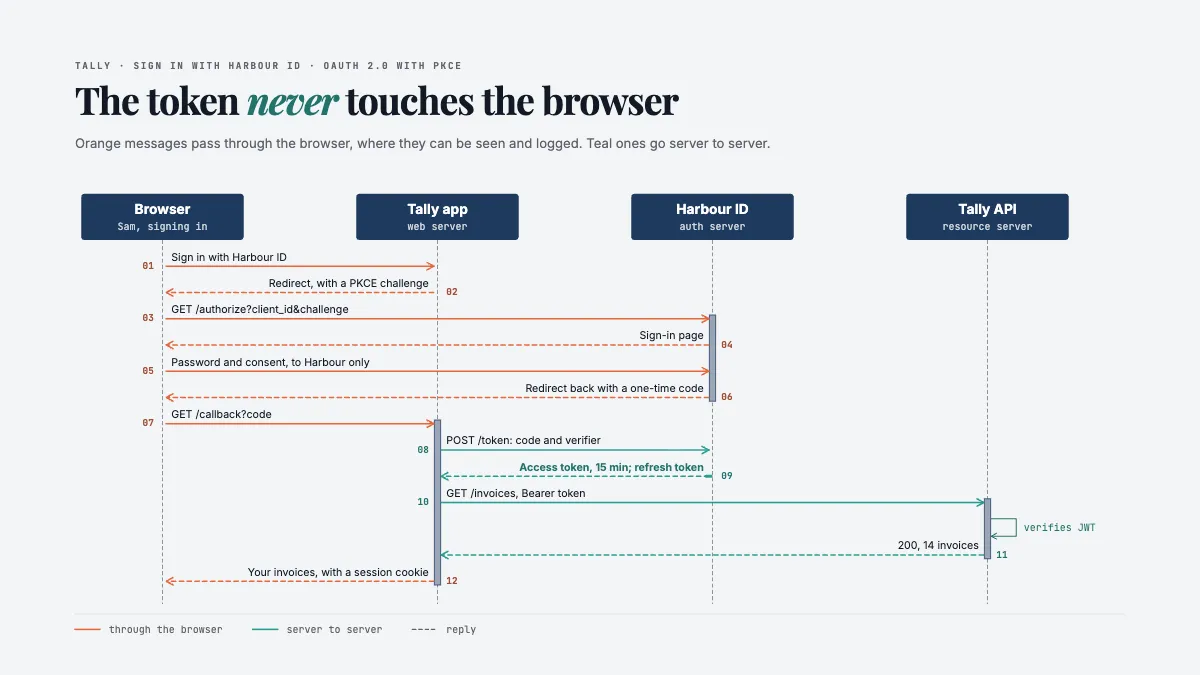
Sign-in with OAuth as a sequence diagram: browser, app, auth server and API, twelve messages in order, coloured by whether the browser can see them.
Free. It opens in the Motionix editor as your own copy.
Download the pictureWebP, 1200 × 675, free to use. To change the words or colours, open it in the editor.
- Size
- 1920 × 1080 px
- Pages
- 1
- Motion
- Yes, plays live and in GIF or video
- Category
- Technical
What it shows
- Lifelines and ordered messages
- Colour that means front or back channel
- Messages drawn in order
Good for
How to use it
- Open the template. It becomes a project in your account.
- Change the words, colours and pictures. Every part is an ordinary shape, line or text box.
- Press Play to watch it build, then present it or export it.
What is an OAuth sequence diagram?
An OAuth sequence diagram shows, message by message, how a user signs in or grants access through OAuth 2.0. Vertical lifelines stand for the browser, the client app, the authorization server and the API, and horizontal arrows show each request and response in time order. The flow most often drawn is the authorization code flow with PKCE, which keeps the access token out of the browser.
When it helps
- A backend developer adding a "sign in with" button for a third-party identity provider.
- A security review checking that tokens never pass through the browser, where they could leak.
- Explaining to a new team member why the app sends users to another site to sign in.
- Debugging a failed sign-in by comparing real network requests with the expected sequence.
Tips
- Number every message. Sign-in bugs are usually a step out of order or a redirect to the wrong URL, and numbered arrows let you point at exactly which one.
- Draw requests as solid arrows and replies as dashed ones, the usual UML convention. It shows at once which side starts each exchange.
- Include the state parameter and the redirect URI check. Leaving them off the diagram is how they get left out of the code, and both guard against forged requests.
How to draw an OAuth sequence diagram
Draw the lifelines
Put the participants across the top, usually the browser, the client app, the authorization server and the resource server or API, each with a dashed line running down the page.
Start the flow
The user asks to sign in, and the app redirects the browser to the authorization server with its client ID, the scopes it wants, a state value and a PKCE code challenge.
Show sign-in and consent
The authorization server shows its own sign-in page, so the password goes to it and never to the app. After consent, it redirects back with a short-lived authorization code.
Exchange the code
The app's server sends the code and the PKCE code verifier to the token endpoint. The server checks the verifier against the challenge and returns an access token and, often, a refresh token.
Call the API
The app calls the API with the access token in an Authorization: Bearer header. The API validates it, for example by checking a JWT's signature and expiry, before returning data.
Separate front and back channel
Mark which messages pass through the browser and which go server to server. The front channel can be seen and logged, so tokens should travel only on the back channel.
FAQQuestions
Common questions.
What is PKCE in OAuth?
PKCE, Proof Key for Code Exchange, pronounced "pixy", protects the authorization code flow. The app creates a random code verifier, sends a hashed form of it called the code challenge at the start, and must present the original verifier when it exchanges the code. A stolen code is useless without it.
What is the difference between OAuth and OpenID Connect?
OAuth 2.0 is about authorisation: letting an app call an API on a user's behalf with an access token. OpenID Connect is a layer on top that adds authentication, returning an ID token that says who the user is. Most "sign in with" buttons use OpenID Connect over OAuth.
What is the difference between an access token and a refresh token?
An access token is short-lived, often minutes to an hour, and is sent with every API call. A refresh token lasts longer and goes only to the authorization server, to get a new access token without asking the user to sign in again. Refresh tokens must be stored securely.
More technical templates
Architecture, networks, circuits, plans and data.