Free templateWeekly status report
Weekly project status
A four-page status report in one signal language: outlined status pills, milestones against a today line, risks with owners and the decisions you need.
Free. It opens in the Motionix editor as your own copy.
Download the pictureWebP, 1200 × 675, free to use. To change the words or colours, open it in the editor.
- Size
- 1920 × 1080 px
- Pages
- 4
- Motion
- Yes, plays live and in GIF or video
- Category
- Presentations
Every page
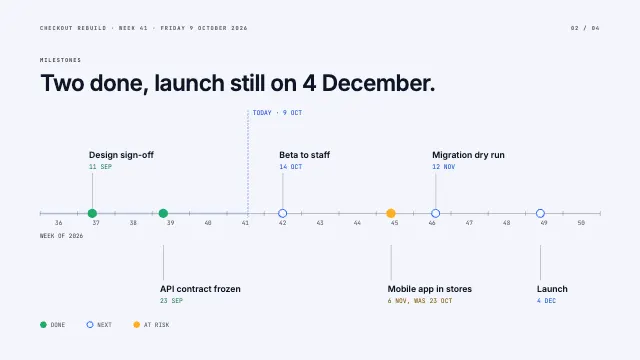 Page 2
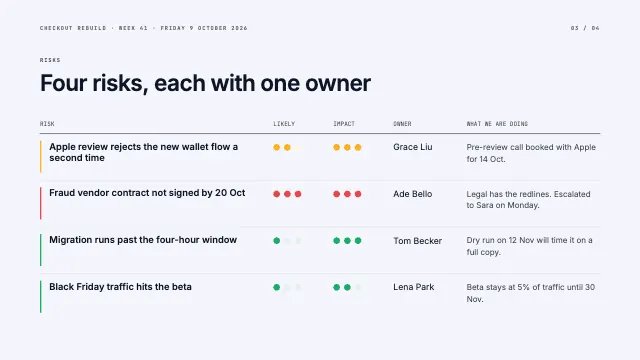 Page 3
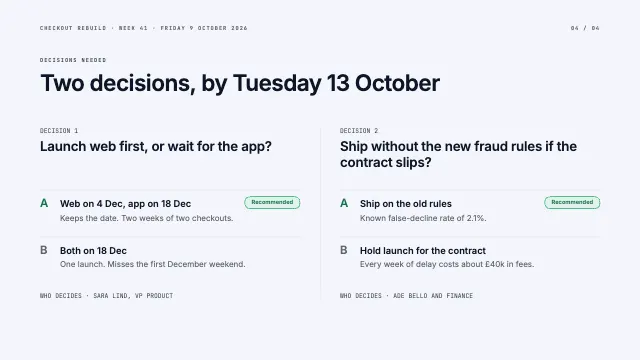 Page 4
What it shows
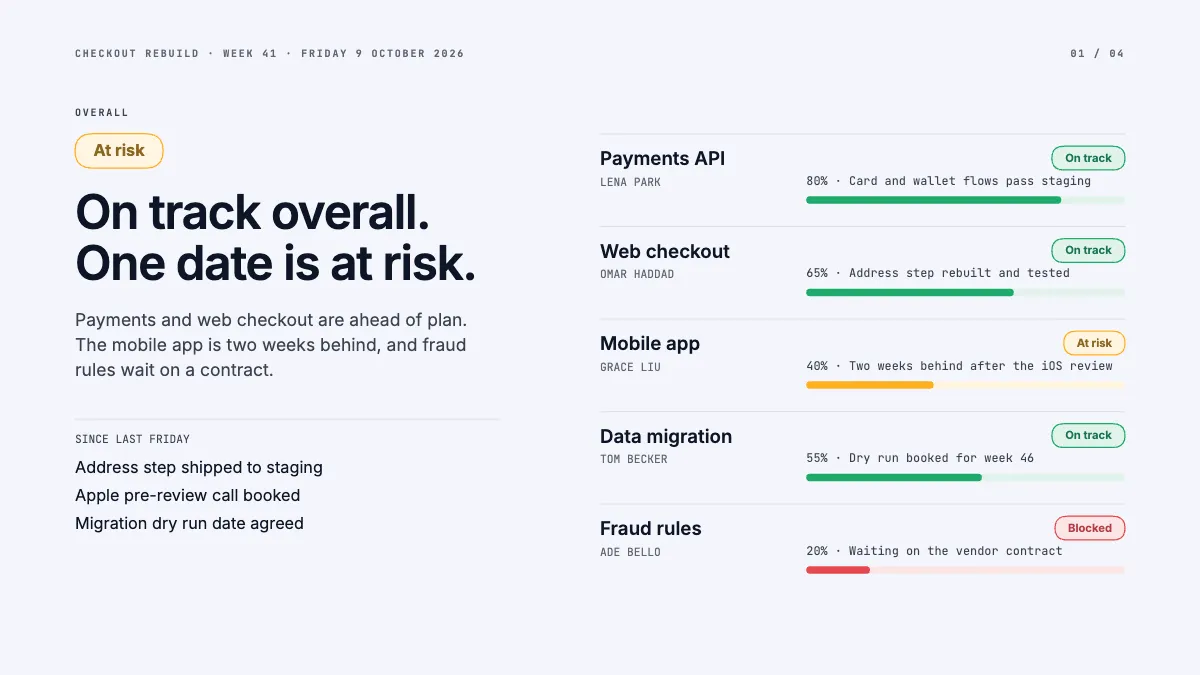
- Outlined status pills
- Milestones on a dated timeline
- Risk table with likelihood dots
Good for
How to use it
- Open the template. It becomes a project in your account.
- Change the words, colours and pictures. Every part is an ordinary shape, line or text box.
- Press Play to watch it build, then present it or export it.
What is a weekly status report?
A weekly status report tells stakeholders where a project stands: the overall status, progress against milestones, the risks and the decisions the team needs. Many teams rate each workstream with a simple scale such as on track, at risk or blocked, often coloured green, amber and red. A good one can be read in a few minutes and always leads with the news.
When it helps
- Project managers updating a sponsor on a product launch every Friday.
- Product teams sharing progress across engineering, design, marketing and support.
- A programme with several workstreams, each with an owner and a rough percentage done.
- Escalating a slipping date or an unsigned contract before it turns into a crisis.
Tips
- Keep the format identical every week so readers learn where to look; change the content, never the layout.
- Report bad news early and plainly. An amber raised two weeks ahead is a plan; a red discovered on launch day is a crisis.
- Write the status in words beside its colour, such as at risk, so the report works in print, for colour-blind readers and in a forwarded email.
How to write a weekly status report
Lead with the overall status
State the headline in one sentence, such as on track overall with one date at risk. A reader who stops after the first slide should still know what matters.
List workstreams with owners
Give each stream its owner, rough progress and a status of on track, at risk or blocked, with one line explaining why.
Plot milestones against today
Draw milestones on a dated timeline with a line marking today. Show a slipped date beside the original, like 6 Nov, was 23 Oct, so the change is honest.
Score each risk
Rate every risk for likelihood and impact and give it one owner and a next action. A risk without an owner is only a worry.
Ask for decisions explicitly
Finish with the decisions you need, the options and their trade-offs, and the date by which you need an answer from the reader.
FAQQuestions
Common questions.
What should be in a weekly status report?
Overall status, progress since last week, what is planned next, milestones and dates, risks and issues with owners, and any decisions or help needed. Keep it brief enough to read in a few minutes, with links to the detail for anyone who wants more.
What does RAG status mean?
Red, amber and green, a common way to rate a project or workstream. Green means on track, amber means at risk and needing attention, and red means off track or blocked. Agree in advance what makes something amber or red, so ratings stay consistent.
Who should receive a weekly status report?
The project sponsor, key stakeholders and the lead of each workstream. Some teams send a short version to a wider group and a fuller one to the core team. Ask recipients what they need rather than sending everything to everyone.
More presentations templates
Decks for pitches, lectures, reviews and talks.