Free templateSwimlane diagram
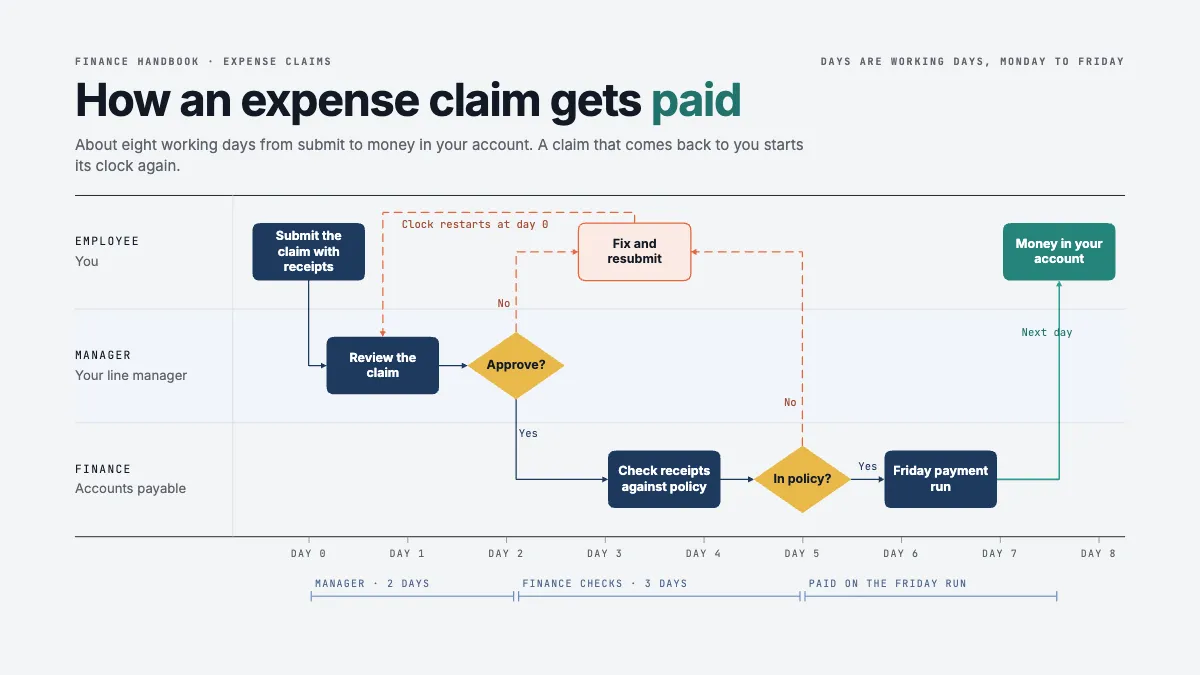
Expense claim swimlane
Three lanes on a scale of working days, so the route of a claim is also its timetable and the return loop runs backwards.
Free. It opens in the Motionix editor as your own copy.
Download the pictureWebP, 1200 × 675, free to use. To change the words or colours, open it in the editor.
- Size
- 1920 × 1080 px
- Pages
- 1
- Motion
- Yes, plays live and in GIF or video
- Category
- Processes
What it shows
- Swimlane diagram
- Decisions and a return loop
- Service times on a day scale
Good for
How to use it
- Open the template. It becomes a project in your account.
- Change the words, colours and pictures. Every part is an ordinary shape, line or text box.
- Press Play to watch it build, then present it or export it.
What is a swimlane diagram?
A swimlane diagram is a flowchart split into parallel lanes, one for each person, team or system involved in a process, so every step sits in the lane of whoever does it. Arrows that cross from one lane to another show handoffs, which is where most delays and mistakes happen. It is also called a cross-functional flowchart or a Rummler-Brache diagram.
When it helps
- A finance team explaining to staff how an expense claim travels from submission to payment.
- A process review that needs to find every handoff between departments and how long each one waits.
- Onboarding new managers, who need to see exactly which approvals sit with them.
- Agreeing service times between teams, with each lane's turnaround written beside its steps.
Tips
- Name lanes after roles, not people. Accounts payable still exists when the clerk leaves; a lane labelled with a first name needs redrawing every time the team changes.
- Draw the process as it really runs, including the workarounds, before you draw how it should run. Improvement starts from the honest version.
- Keep arrows flowing in one direction, usually left to right, and let only rework loops run backwards. A reader should spot the exceptions at a glance.
How to make a swimlane diagram
Choose the lanes
List every role, team or system that touches the process and give each one a lane. Three to six lanes keep the diagram readable; more usually means the scope is too wide.
Mark the start and finish
Decide the event that starts the process, such as an employee submitting a claim, and the outcome that ends it, such as money arriving. Everything else sits between them.
Place each step in its lane
Write each step as a short verb phrase and put it in the lane of whoever does it. If two lanes seem to share a step, it is really two steps and a handoff.
Add decisions and loops
Use a diamond wherever the process branches, with labelled yes and no exits. Draw rework loops back to the step they return to, so the cost of a rejection is visible.
Show time along the flow
If timing matters, lay the lanes against a scale of hours or working days. A handoff that looks short on a plain flowchart often turns out to be the longest wait.
FAQQuestions
Common questions.
Who invented the swimlane diagram?
Swimlane diagrams were popularised by Geary Rummler and Alan Brache in their 1990 book Improving Performance, which is why they are sometimes called Rummler-Brache diagrams. Business Process Model and Notation, known as BPMN, later made pools and lanes part of its standard notation.
What is the difference between a swimlane and a flowchart?
A swimlane diagram is a flowchart with an added dimension: responsibility. An ordinary flowchart shows what happens in what order; lanes add who does each step, so handoffs between people or teams become visible as arrows crossing lane lines.
Should swimlanes be horizontal or vertical?
Either works, and the meaning is the same. Horizontal lanes suit wide pages and slides and read naturally left to right with time. Vertical lanes suit tall documents and long processes that run down the page. Pick one direction and keep it throughout a set of diagrams.
More processes templates
Flowcharts, procedures and step-by-step journeys.