Free templateClass timetable
Year 6 timetable
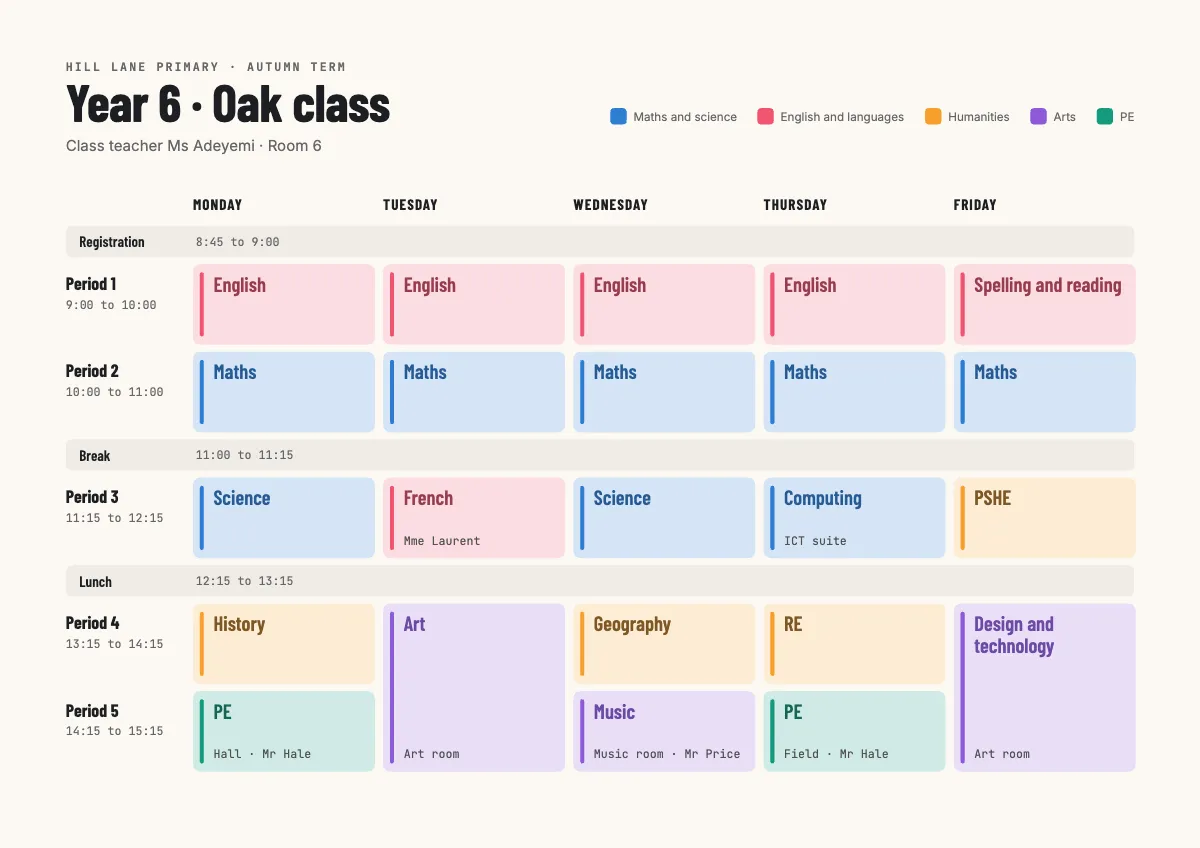
A weekly class timetable on A4 landscape: five days by period, with registration, break and lunch, and subjects in five soft families.
Free. It opens in the Motionix editor as your own copy.
Download the pictureWebP, 1200 × 848, free to use. To change the words or colours, open it in the editor.
- Size
- 1754 × 1240 px
- Pages
- 1
- Motion
- Yes, plays live and in GIF or video
- Category
- Lessons
What it shows
- Timetable grid with a double lesson
- Colour by subject family
- Condensed type for tight cells
Good for
How to use it
- Open the template. It becomes a project in your account.
- Change the words, colours and pictures. Every part is an ordinary shape, line or text box.
- Press Play to watch it build, then present it or export it.
What is a class timetable?
A class timetable is a grid that shows what a class is taught at each point of the school week. Days usually run across the top and periods down the side, with fixed times such as registration, break and lunch shown as bands across every day. Each cell gives the subject and, where needed, the room or the teacher.
When it helps
- A primary class teacher planning a week that fits in every subject's expected hours.
- Displaying the week on the classroom wall so pupils know what comes after break.
- Sharing with parents so they know which days need PE kit or a musical instrument.
- Briefing a supply teacher on where the class goes and who teaches each lesson.
Tips
- Use condensed type or agreed abbreviations for long names like design and technology; cells fill fast once rooms and teachers are added.
- Keep the same subject in the same slot each day where you can; pupils settle faster when Monday's first lesson matches Tuesday's.
- Pair every colour with a written label, never colour alone, so the grid still works for colour-blind pupils and when printed in black and white.
How to make a class timetable
Start with fixed times
Block in the school day's set points first: registration, break, lunch and home time. These are the same every day and frame everything else.
Place shared slots next
Add lessons that depend on other people or rooms, such as PE in the hall, music with a specialist or the computer suite. These have the least room to move.
Put core subjects in the mornings
Many primary schools keep English and maths in the first sessions each day, when children are freshest, and move practical subjects into the afternoon.
Use doubles where they help
Art, design and technology and science investigations often need a double lesson to allow for setting up, working and tidying away.
Colour by subject group
Give each family of subjects a colour, for example maths and science, English and languages, humanities, arts and PE. The balance of the week then shows at a glance.
Check the totals
Count the hours each subject gets across the week and compare them with your school's curriculum plan before you share the timetable.
FAQQuestions
Common questions.
What is a double lesson?
A double lesson is two consecutive periods given to the same subject, so it runs for twice the usual time. Schools use them for practical work, such as art, science experiments or design and technology, where setting up and clearing away would eat into a single period.
What should a class timetable include?
The days, the start and end time of every period, each lesson's subject, registration, breaks and lunch, and any room or teacher that differs from the usual. A key to colours or abbreviations helps, as do the class name and term, so old copies are not mistaken for the current one.
How do you make a timetable easy for children to read?
Keep it large, use one colour per subject group and add small pictures for younger pupils. Few words per cell help, and a day should be readable from the back of the room. Point to it at each change of lesson so children learn to check it themselves.
More lessons templates
Concepts, processes and revision pages for classrooms and courses.