Free templateShop WhatsApp status
Fresh today
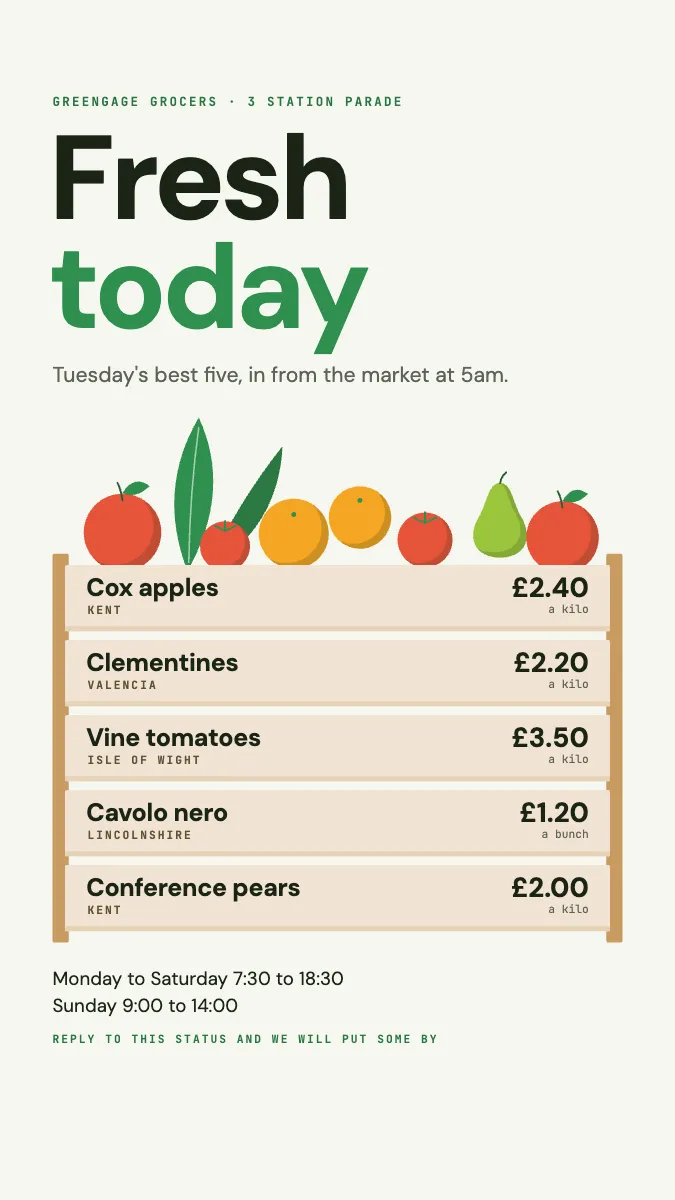
A WhatsApp status for a greengrocer: the five best things today, priced on the boards of a drawn crate, produce piled on top.
Free. It opens in the Motionix editor as your own copy.
Download the pictureWebP, 675 × 1200, free to use. To change the words or colours, open it in the editor.
- Size
- 1080 × 1920 px
- Pages
- 1
- Motion
- Yes, plays live and in GIF or video
- Category
- Posters and print
What it shows
- The list is the crate
- Fruit drawn from circles
- Builds board by board
Good for
How to use it
- Open the template. It becomes a project in your account.
- Change the words, colours and pictures. Every part is an ordinary shape, line or text box.
- Press Play to watch it build, then present it or export it.
What should a shop WhatsApp status show?
A shop WhatsApp status is a short-lived photo or graphic, shared with a business's contacts, that shows what is new or best today. For a greengrocer, bakery or deli it works like a window display on the phone: a handful of products, their prices, perhaps where they come from, and an easy way to reserve. Status updates disappear after 24 hours, so they suit daily stock.
When it helps
- A greengrocer posting the five best things on the shelves each morning.
- A bakery showing what has just come out of the oven so regulars can reserve.
- A butcher or fishmonger announcing the day's specials before the lunchtime rush.
- A small shop sharing changed opening hours on a bank holiday.
Tips
- Keep a consistent layout every day and change only the products; regulars learn where to look for prices and recognise the shop at a glance.
- Use large type; a status is viewed on a phone held at arm's length, often in passing.
- Ask customers to save the shop's number; without it, they will not see status updates at all.
How to make a WhatsApp status for a shop
Design for a tall screen
Work in portrait at 9:16, 1080 x 1920 pixels, and keep text away from the top and bottom edges where the app places its own controls.
Pick a few products only
Choose about five things worth coming in for today. A status is seen for a few seconds, so a long list gets skipped.
Give price and origin
Put the price beside each item and, where it is a selling point, where it is from, such as Kent or the Isle of Wight.
Add hours and a reply prompt
Include the opening hours and invite people to reply to reserve something, since replies arrive as a private message to the shop.
Post it early
Share it soon after opening, so customers see it while planning their day, and post a fresh one tomorrow rather than editing.
FAQQuestions
Common questions.
How long does a WhatsApp status last?
A WhatsApp status update disappears automatically 24 hours after it is posted. The person who posted it can see who viewed it during that time, and can delete it earlier if stock runs out or details change.
Who can see a WhatsApp Business status?
Status updates are shared with contacts, subject to the status privacy setting. In practice a customer usually needs the shop's number saved in their phone to see its updates, which is why shops ask customers to save the number.
What size should a WhatsApp status image be?
A portrait image of 1080 x 1920 pixels, an aspect ratio of 9:16, fills the screen on most phones. Other shapes are shown with bars or cropped, so design to that size and keep key text inside the central area.
More posters and print templates
Menus, notices, invitations, signs and certificates.