Free templateCafe menu
Café menu
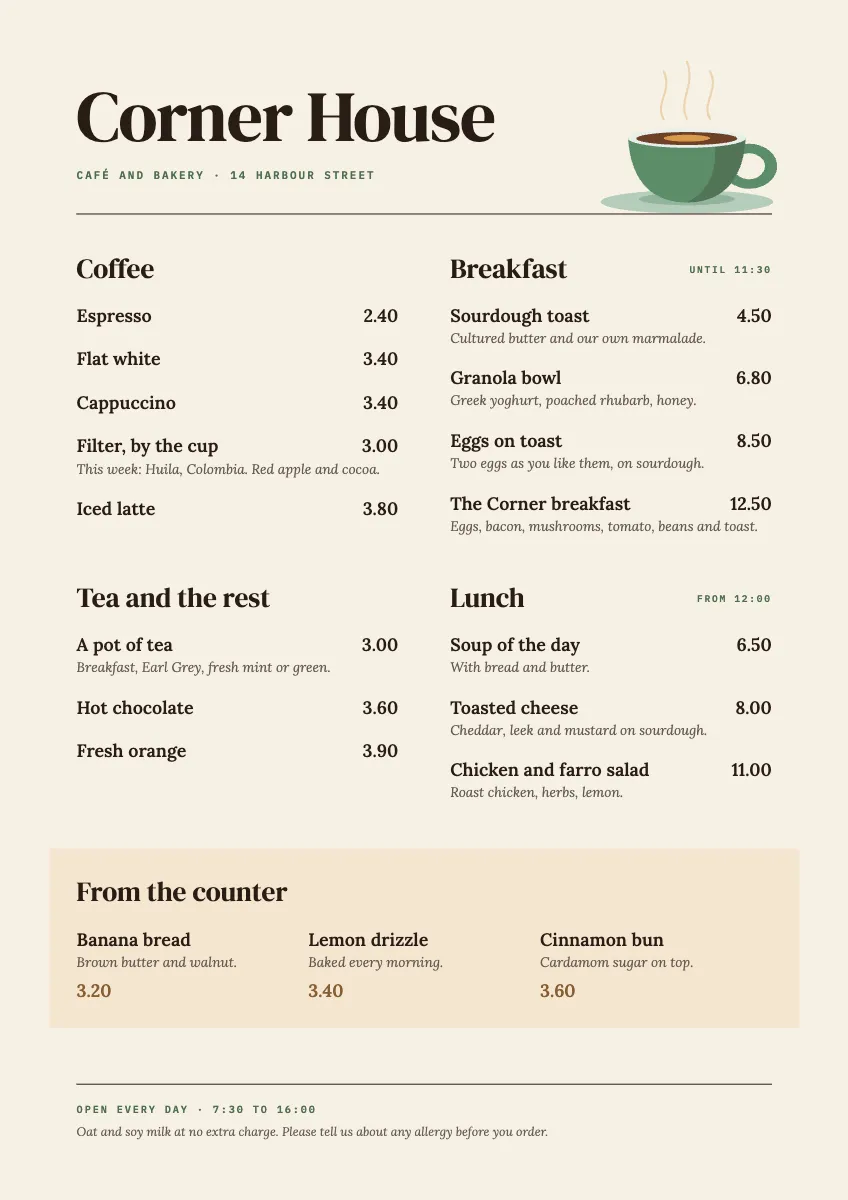
An A4 menu set like a good book page: two columns, prices on one edge, descriptions in italic, and a single drawn cup.
Free. It opens in the Motionix editor as your own copy.
Download the pictureWebP, 848 × 1200, free to use. To change the words or colours, open it in the editor.
- Size
- 1240 × 1754 px
- Pages
- 1
- Motion
- A still page; add motion if you like
- Category
- Posters and print
What it shows
- A4 print
- True italics
- Line drawing
Good for
How to use it
- Open the template. It becomes a project in your account.
- Change the words, colours and pictures. Every part is an ordinary shape, line or text box.
- Add motion if it helps, then present it or export it.
What should be on a cafe menu?
A cafe menu lists what is served, grouped the way customers order: coffee, tea and other drinks, breakfast, lunch and things from the counter. Each item needs a clear name, a price and, where it helps, a short description of what is in it. A good menu also gives opening hours, any serving times such as breakfast until 11:30, and a line about allergies.
When it helps
- A new cafe printing its first table menu before opening day.
- A bakery cafe adding a lunch section and needing the layout to stay readable.
- A counter menu by the till for customers who order before they sit down.
- Updating prices or a seasonal coffee without redesigning the whole menu.
Tips
- Leave out dotted leader lines from dish to price; they push the eye straight to the numbers and make the menu look like a price list.
- Use italic for descriptions and roman for dish names so two levels of information read apart without extra colours or sizes.
- Print on a heavier, coated or laminated stock if menus sit on tables; thin paper curls and stains within days.
How to make a cafe menu
Group items as people order
Organise sections by what customers decide first, usually drinks, then food by time of day. Keep each section short enough to scan in a few seconds.
Write short, specific descriptions
Name the ingredients that make a dish yours, such as poached rhubarb or cultured butter, in one line. Specific nouns sell better than adjectives like delicious.
Align the prices
Set every price on the same edge of its column so they line up, and keep the format consistent, either 3.40 or 3.4, never both.
Add hours and allergy information
Put opening hours and serving times where they are easy to find, and tell customers how to ask about allergens before they order.
Set up the file for print
Work at the finished size, A4 is 210 x 297 mm, with 3 mm bleed on every edge, images at 300 dpi and text kept well inside the trim.
FAQQuestions
Common questions.
What size should a cafe menu be?
A4 (210 x 297 mm) is the most common size for a single sheet table menu, and A5 suits a small cafe with a short list. Large boards behind the counter work for menus customers read while queuing. Pick the size from how many items you have.
Do cafes have to list allergens on the menu?
In the UK, food businesses must be able to give customers information about 14 major allergens in the food they serve. For food made to order this can be given by staff, as long as the menu or a sign tells customers to ask. Rules differ in other countries.
Should a menu include the currency symbol?
Many menu designers leave it out, writing 3.40 rather than £3.40, because the number alone looks calmer and draws less attention to cost. Either is fine, as long as prices are clear and every price follows the same format.
More posters and print templates
Menus, notices, invitations, signs and certificates.