Free templateComparison table
Mortgage comparison
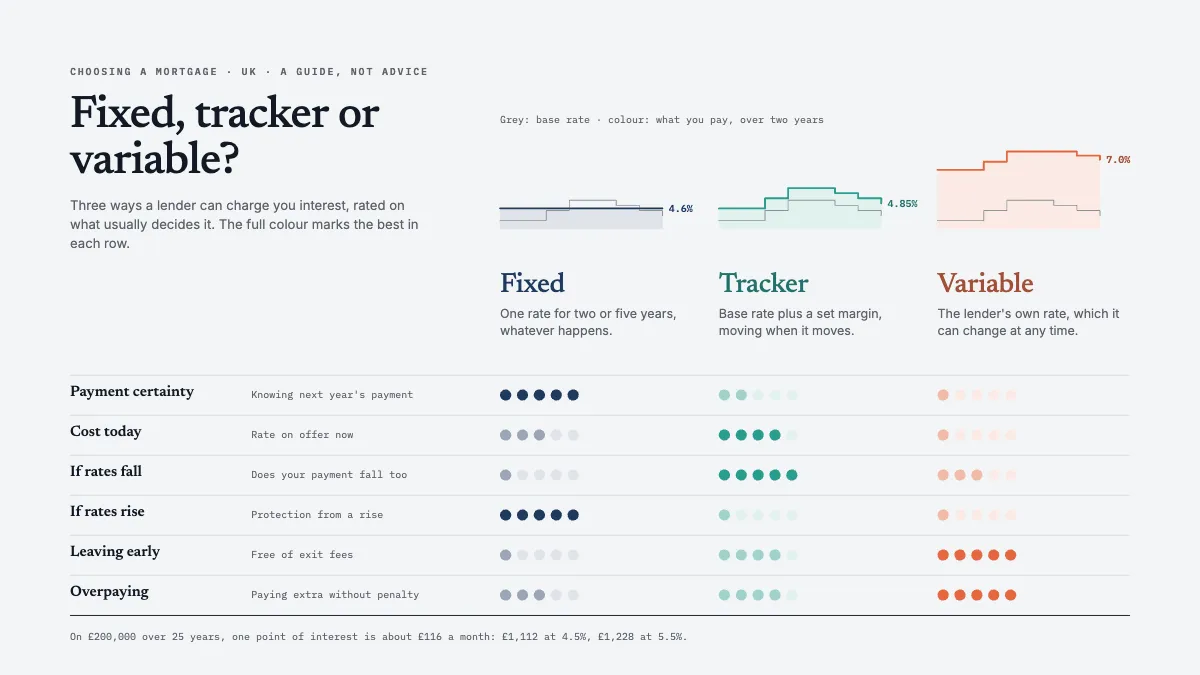
Fixed, tracker and variable mortgages compared on six criteria in a calm table of dot ratings, each with how its rate moves.
Free. It opens in the Motionix editor as your own copy.
Download the pictureWebP, 1200 × 675, free to use. To change the words or colours, open it in the editor.
- Size
- 1920 × 1080 px
- Pages
- 1
- Motion
- Yes, plays live and in GIF or video
- Category
- Frameworks
What it shows
- Dot ratings
- Rate behaviour sparklines
- Best in each row marked
Good for
How to use it
- Open the template. It becomes a project in your account.
- Change the words, colours and pictures. Every part is an ordinary shape, line or text box.
- Press Play to watch it build, then present it or export it.
What is a comparison table?
A comparison table sets two or more options side by side against the same list of criteria, so a reader can see the trade-offs at a glance. Options run across the top as columns and criteria run down the side as rows, with each cell holding a value, a rating or a tick. The best tables explain each option before rating it and make the winner of every row obvious.
When it helps
- A mortgage adviser walking a first-time buyer through fixed, tracker and variable rates.
- Choosing between suppliers, software or contractors on price, support and contract length.
- A product page helping customers pick between models or plans.
- A board paper that needs a clear recommendation backed by the criteria behind it.
Tips
- Keep each option's colour the same down its whole column, so the eye can follow one choice through every row.
- Ratings hide judgement. Say in a note what a top score means for each criterion, or readers will assume the scale is objective.
- Avoid a total score unless the criteria are weighted. A plain sum treats exit fees as mattering exactly as much as payment certainty, which is rarely true.
How to make a comparison table
Choose the options
Limit the table to the real choices, usually two to five. With more columns than that, readers stop comparing and start skimming.
Define each option first
Put a one-line definition under each column head, such as "base rate plus a set margin" for a tracker. Nobody can compare options they do not understand.
Pick the criteria that decide
List the questions a buyer actually weighs, such as payment certainty, cost today, leaving early and overpaying. Put the most important first and drop any row where every option scores the same.
Use one rating scale
Rate every cell on the same scale, such as one to five dots, or use real values with units. Mixing ticks, words and numbers makes rows hard to read across.
Mark the best in each row
Highlight the winner of every row in the same way, so the pattern of strengths shows without reading every cell.
Show the facts behind ratings
Add a worked example or a source beneath the table, such as what one percentage point of interest costs a month, so readers can test the ratings for themselves.
FAQQuestions
Common questions.
What is the difference between a fixed, tracker and variable mortgage?
A fixed rate stays the same for a set period, often two or five years. A tracker follows the central bank's base rate plus a set margin, so it moves when the base rate moves. A standard variable rate is set by the lender, which can change it at any time.
How do you compare options fairly in a table?
Use the same criteria and scale for every option, take all values from the same date and source, and state your assumptions, such as the loan size or the period. Show where each option is weakest as clearly as where it is strongest.
Should a comparison table use ticks or ratings?
Ticks suit yes-or-no features, such as whether early repayment is free. Ratings or real values suit criteria that come in degrees, like cost or flexibility. Many good tables use both, but keep to one kind per row so it reads across cleanly.
More frameworks templates
Matrices, org charts, canvases and models for thinking.